Blog

app ·

Lumae: The AI Agent Video Editor for Screen Recordings and Screenshots
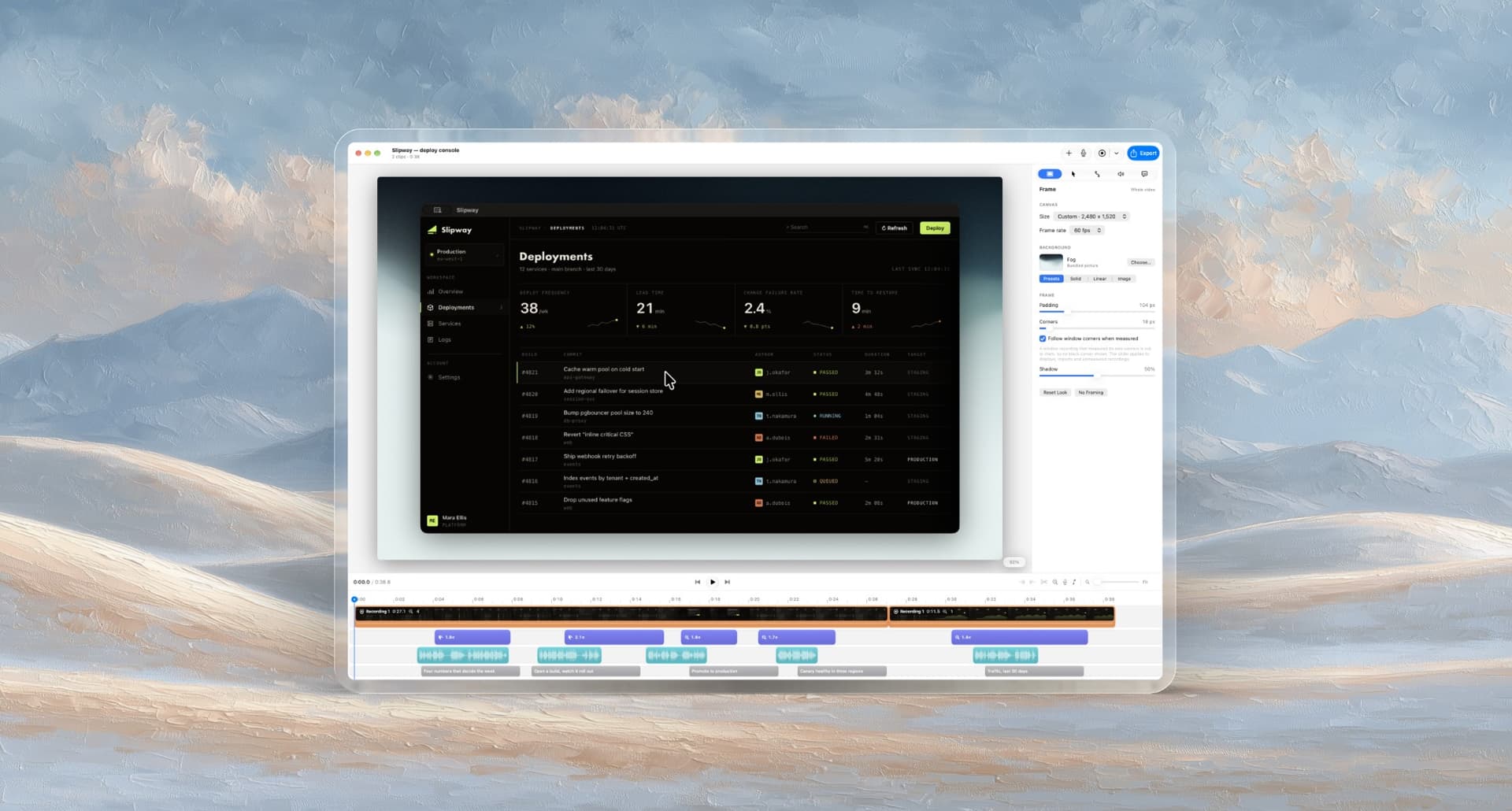
Lumae: The AI Agent Video Editor for Screen Recordings and Screenshots

A ninety-second product demo used to mean four apps and a re-encode at every handoff, plus a fifth app for the screenshots nobody counts. So I built Lumae to do the whole job in one place, and because I spend my day with an agent open beside me, I built it so an agent can do the editing too. Here's what each of those actually took, and the one decision that made the second one almost free.

Download

Making a ninety-second product demo used to mean opening four apps. Not because the editing was difficult, but because no one tool did the whole job.

Recording was never the hard part. It was everything after. Re-record the one take where I fumbled a click, without losing the four that were fine. Stitch that recording onto an imported clip. Narrate over the finished sequence. Put a music bed underneath that gets out of the way when I talk. Then, because the release note also needs three annotated screenshots of the same window, open a fourth app with its own opinions about what an arrow looks like.

Most of those tools were good at about two thirds of it, which is a worse place to be than half. Two thirds is close enough that you keep using it and pay the handoff tax every time, with a re-encode at every step. And when one of them was genuinely a single feature short, my only move was to file a request and wait a quarter.

So I built Lumae to do the whole job in one place. And because I spend my working day with Claude Code open beside me, I built it so an agent can do the editing too.

Here’s what each of those actually took.

All of it in one app

The recording part is the easy half, so start with what usually forces an export.

You can re-record a single clip in place. The old take stays in the project, the new one lands in the same slot, and nothing else on the timeline moves. That one feature is most of why I stopped bouncing between apps, because fumbling a click forty seconds in used to mean starting over or stitching in a second tool.

Recordings and imported files sit on the same timeline and can be trimmed, split and reordered together. You narrate over the assembled sequence while it plays, and the clip audio ducks under your voice on smooth ramps instead of you riding a fader. A music track does the same thing under the narration. Captions get transcribed on your Mac with Apple’s speech models, split at sentence ends and pauses, then edited inline.

Everything on that timeline follows the same rules. Clips, zooms, captions, narration takes and music all move, trim, split and snap identically, and none of them can overlap a neighbour on its own lane. That sounds like a small thing and it’s the difference between an editor you can predict and one you fight.

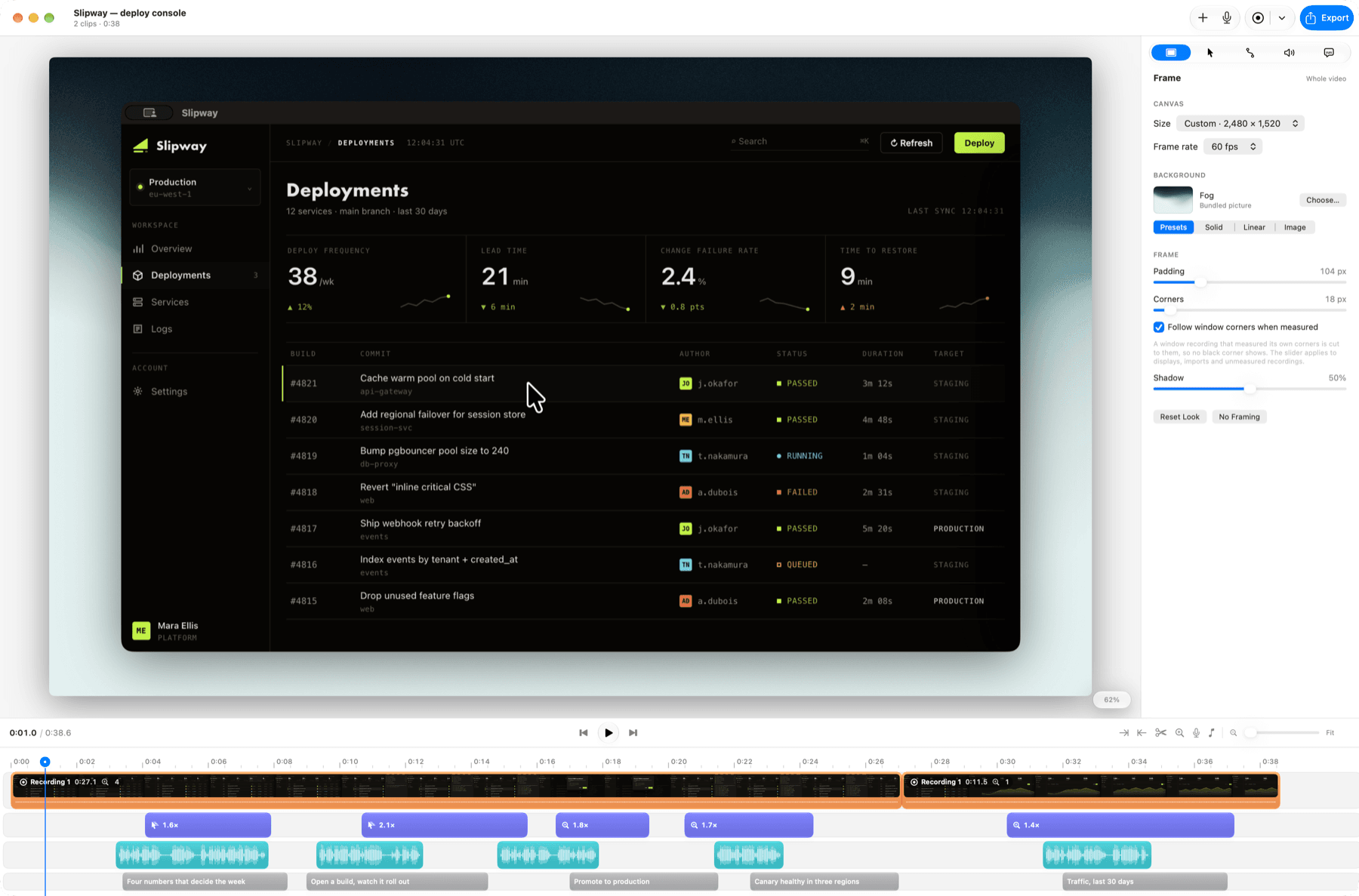
One project, five lanes. Clips in orange, zooms in purple, narration takes as waveforms, captions below. Every lane moves, trims, splits and snaps the same way, because they all go through the same commands.One project, five lanes. Clips in orange, zooms in purple, narration takes as waveforms, captions below. Every lane moves, trims, splits and snaps the same way, because they all go through the same commands.

Screenshots are the other half nobody counts. A release note is usually a short video and three annotated pictures of the same window, done in the same sitting, and that used to be a whole second application. In Lumae a global shortcut grabs a display, a window or an area, and the picture opens in an annotation editor: arrows, boxes, ellipses, highlights, mosaic blur, text and numbered steps, on the same backdrops and framing a recording uses.

The marks stay objects. Nothing is painted onto the pixels, so you can reopen a screenshot a week later and move the arrow. Under the hood it’s a second kind of document on the same editing engine rather than a picture jammed into a one clip timeline, which is why it shares the framing presets and the library but carries none of the timeline machinery that wouldn’t apply.

The screenshot side. Every mark here is still editable days later: the arrow, the caption, the box, the numbered steps, the mosaic over the names.The screenshot side. Every mark here is still editable days later: the arrow, the caption, the box, the numbered steps, the mosaic over the names.

All-in-one usually means worse at each thing

That’s the fair objection, so here’s the part I spent longest on.

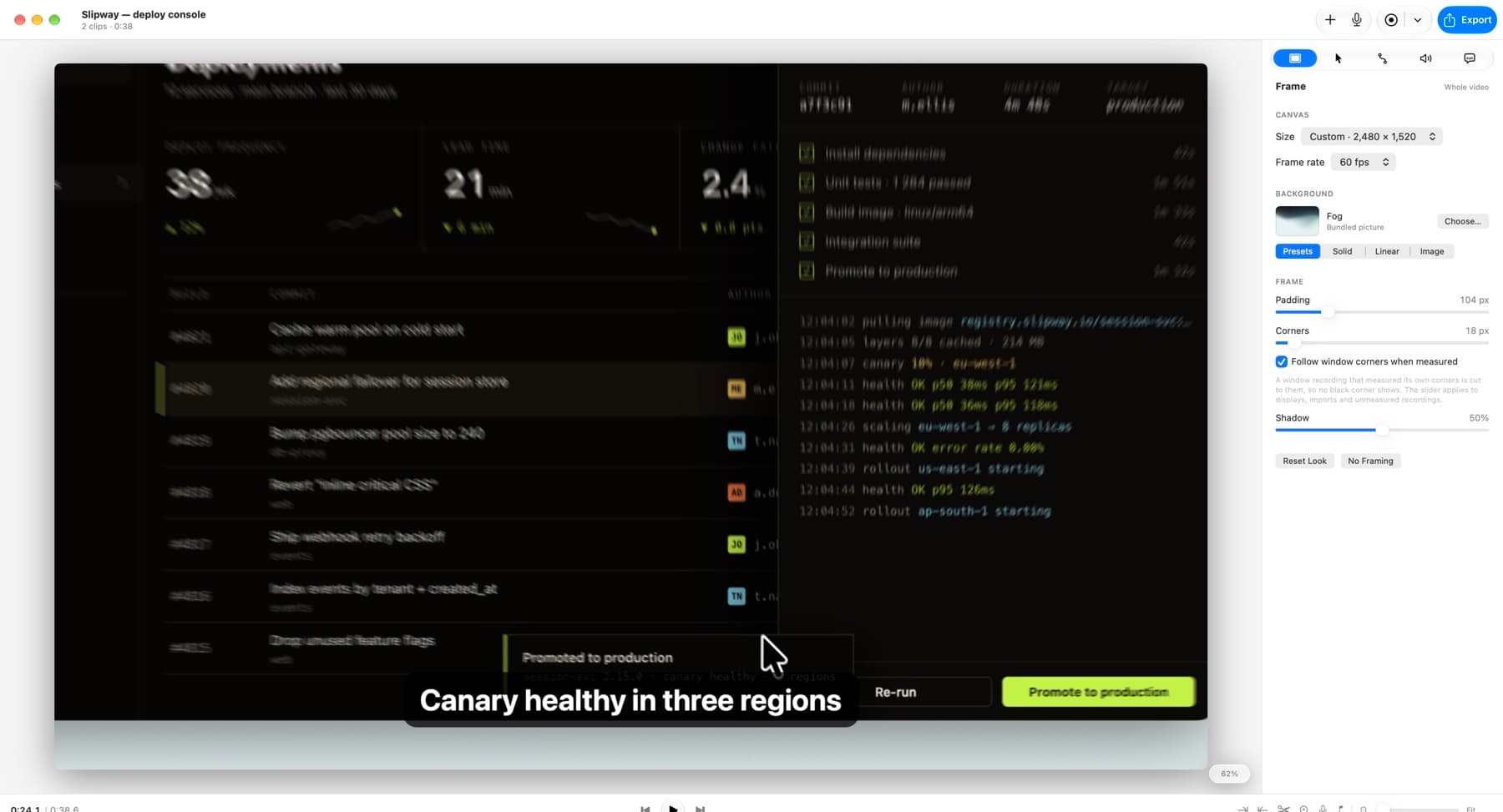
Camera moves get real motion blur. The move is sampled across a virtual shutter and the samples averaged, the way a lens does it, so it’s exact for zooms and pans and costs nothing while the camera is still. The gaps between samples get bridged along the motion, never across it. I tried an isotropic blur first and it just made the picture look soft.

Lumae's preview mid zoom. The streak grows with distance from the pivot and runs along the motion rather than across it, which is what separates a shutter from a blur filter. The caption sits on top, composited after, so it stays sharp.Lumae's preview mid zoom. The streak grows with distance from the pivot and runs along the motion rather than across it, which is what separates a shutter from a blur filter. The caption sits on top, composited after, so it stays sharp.

The bug in that system is my favourite kind. A directional blur’s radius is a half length in pixels. A zoom blur’s amount is a fraction of each pixel’s distance to the centre, about 2% per unit. I was passing pixels where a fraction belonged, which made the streak fifteen times too long and shoved every edge toward the later camera time. It looked like a rendering bug for a week. It was a unit conversion.

The frame is measured, not guessed. A window recording works out its own corner radius from the live frames, cross checked across all four corners until five of them agree. The threshold sits halfway between black and the content beside it, because the curve passes through a few radii of anti-aliased pixels: counting only the fully black ones read a 41 pixel window as 38 and left a thin dark sliver along the corners.

The same recording with the camera at rest. Preview and export share one renderer, so this is the frame you get, and the corners are the radius that window actually has, set by the control on the right.The same recording with the camera at rest. Preview and export share one renderer, so this is the frame you get, and the corners are the radius that window actually has, set by the control on the right.

Both of those are the argument for one renderer serving preview and export. Give the player and the exporter their own and everything above is true in exactly one of them, and you find out which after you ship.

Agent-ready

Cutting dead air, placing zooms on the clicks and writing captions is a one sentence instruction and forty minutes of dragging. In every tool I’d used, that work was locked behind a mouse.

So Lumae is an MCP server. You connect Claude Code, Claude Desktop, Codex CLI or Cursor from Settings, and an agent can list your projects, read them, cut clips, place zooms, write captions, import media, undo and redo. The app launches itself when a client connects.

What makes it usable rather than a demo is that every request lands in the live editor as its own undo step. You watch it work in the window you already have open, and four edits from an agent undo one at a time, like anyone else’s.

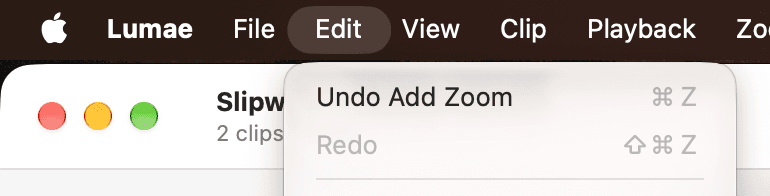
An agent added a zoom over MCP, and the standard Edit menu names it. One request, one undo step.An agent added a zoom over MCP, and the standard Edit menu names it. One request, one undo step.

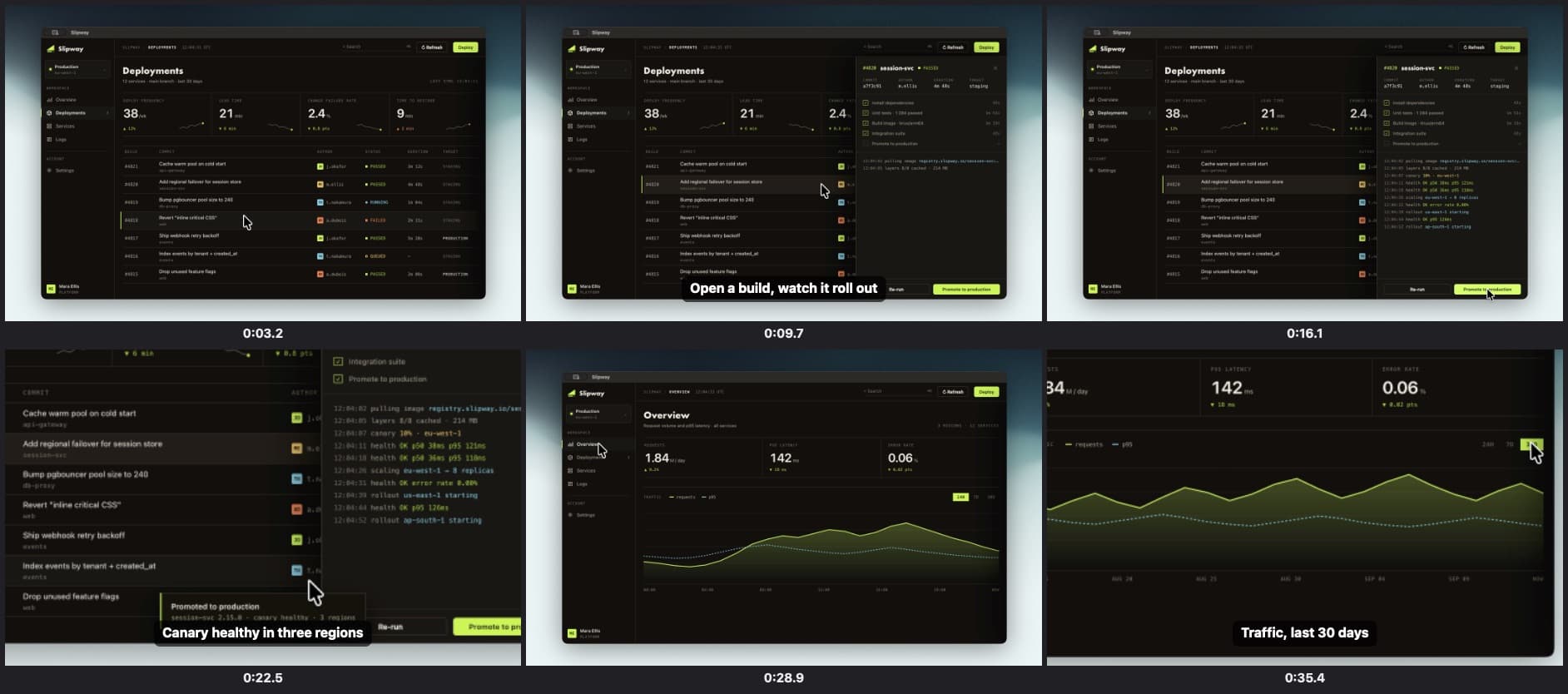
An agent editing blind isn’t much use for video, so it can look too. Every recording carries its click data, and a project summary lists each clip’s clicks in both time bases and in normalized frame coordinates, so “zoom on the thing I clicked at eight seconds” is answerable without a pixel changing hands. When it does need to see, it can render a frame or a labelled contact sheet, and preview a set of edits and render from the result before committing.

What an agent gets back from one call: six composed frames with their timeline times, captions and cursor in place. Enough to work out where the dead air is without guessing.What an agent gets back from one call: six composed frames with their timeline times, captions and cursor in place. Enough to work out where the dead air is without guessing.

There’s also one tool that does nothing at all. An agent calls it when no tool fits what it was asked, passing the goal and the tool that would have served it, and that gets reported as a missing capability rather than a tool call.

I like that one more than anything else in the MCP layer. Normal feature requests come from the small fraction of people annoyed enough to write one. This comes from every agent that got stuck, in the words of the task it was trying to finish. It’s the most honest backlog I’ve had, and it cost about forty lines.

Why both halves were affordable

One app doing five jobs, and an agent doing them too, should have been two large projects. They weren’t, because of a rule I set on day one and never got to break: every change to a project is one small command applied through one editor, and the interface never touches the document directly. Not the timeline drag, not the inspector slider, not the import. The encoding is the wire format, so {"moveClip": {"id": "…", "toIndex": 2}} is both what an agent sends and what the app writes in its own audit trail.

That’s why the second half was nearly free. There was no second code path to write. edit_project hands those same commands to the same call the timeline uses, and the tools that let an agent drag or trim something call the same pure functions your mouse does, so it gets the same clamping and the same refusal to overlap. Neither the model nor the editor changed to support agents, which is the only real test of a rule like that. So I can say it plainly: whatever the interface can edit, an agent can edit, with the same validation, undo and autosave.
Getting Command-Z to work across that boundary took two days of arguing with AppKit. Undo is snapshot based: each commit keeps the previous project value and hands it to the window’s undo manager, which is cheap and correct for compound edits because the project is a few kilobytes of value types.

The trouble is that undo managers group by run loop event. Two commits in the same pass undo together, which is right for a slider emitting twenty values and wrong for an agent sending four requests. Making the tool host wait for the group to close failed interestingly: the pass an agent’s edit lands in outlives the reply, so requests a second apart still merged, and a five second wait never once saw the group close. Closing the group from the commit got me endUndoGrouping called with no matching begin.

What works is narrower. A commit from an agent, arriving between events, turns event grouping off around its own begin and end, so the explicit group ends up top level.

One more decision from that pass. A command whose result equals the document, a slider let go where it started, is valid but isn’t an edit: no undo step, no write. Before that, an agent setting a caption to the text it already had left an undo step that undid nothing.

Making the tool schema impossible to lie

That guarantee only holds if agents hear about every command, so it’s enforced rather than remembered.

The catalogue carries a hand written JSON Schema of the commands, each with an example and a normalizer for whatever an agent may leave out. Hand written schemas rot, so a chain of four checks stops this one rotting, and three of them are the compiler:

  1. The wire names are an enumerable type mapped by an exhaustive switch, so a new command doesn’t compile until it’s named.
  2. Naming it breaks the test’s own exhaustive switch, so a sample has to exist.
  3. The sample fails against the schema’s command list until the schema describes it.
  4. Every example has to decode back to its own case, with every reference resolving.

Before that, the test compared against a hand written array of 43 samples, which a new command left untouched and green. The docs claimed the schema was pinned to the code. The code wasn’t doing that.

Two things I didn’t expect to care about. A default in a schema is a promise: tell an agent it may omit a field and the normalizer has to fill that field individually, not as part of an object. A clip’s audio was only filled when it was absent entirely, so an agent sending {"volume": 0.5} got an error about the isMuted it had just been told was optional. That’s the worst kind of API bug, where the docs are right and the implementation punishes you for believing them.

And the catalogue is a bill. The tool list goes out on every connect, before any work, so its bytes are tokens every session pays. Two tools each embedded the full definitions block: 72 KB of a 94 KB catalogue, about 23,000 tokens, describing the same commands twice. One of them takes exactly the other’s commands, so it now points at its neighbour instead. That’s 60 KB with the same decoding code either way, and a test pins it under 72 KB so the next duplication trips a test instead.

How it got built

I wrote it with Claude Code, and what made that work wasn’t prompting technique. It was three things sitting in the repository.

An architecture document that’s part of the work, not a description of it. It records the decisions and the reasoning meant to outlive them, including the paths that were tried and rejected. The rejected options are the valuable half; without them, something re-proposes the idea that was already measured and found wanting every few days.

A short list of non-negotiables, written down. Native frameworks first. Every change through a command. Nondestructive. Warning free builds and passing tests before anything counts as done. Your real recordings are read only. Those aren’t style preferences, they’re the constraints that keep the codebase the shape it is, and they need to be in front of whoever is writing, human or not.

And a pure value model with heavy tests over it. This is what actually set the pace: the model is value types and the commands are pure functions, so a correctness question is a unit test rather than a session with a running app.

The honest failure mode is that the document is both the asset and the bottleneck. When I moved fast and let it drift, the next few changes fought the architecture instead of using it, and I paid that back with interest.

What’s next

The other half of the agent idea belongs inside the app. Natural language editing, where you type what you want changed, Lumae turns it into a plan of these same commands, shows you a preview of the result, and applies it when you say so. Nothing touches your project until you approve it. Most of the plumbing is already there, since previewing returns the resulting project without committing and a batch of commands applies as one undo step.

After that, the things the comparison table on the site admits are missing. A webcam overlay. Shareable links. MCP resources and prompts, so an agent can be handed a project as context instead of asking for it.

Lumae is free, there’s no account and no watermark, and nothing you make leaves your Mac.

Comments